 Returned Spreadsheet Column
| Document Version | v.1 |
|---|---|
| Document Last Updated | 03/19/25 |
| Software Version Documented | v.10.2.51 |
Overview
The Return Column can be added to the Sales Order Spreadsheet to display the quantity returned on Hard Linked RMA’s receiver(s).
Adding ‘Returned’ Column to a User’s Spreadsheet Grid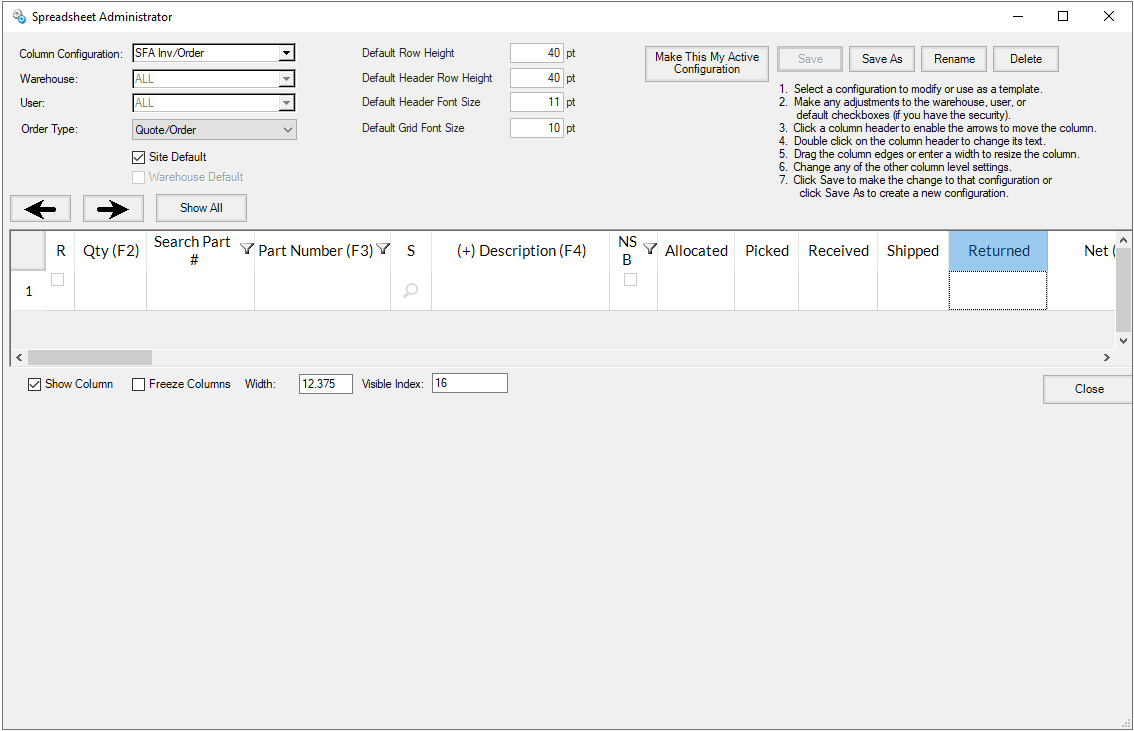
- The Column has been added and can be placed onto a user’s Quote/Order spreadsheet through the Spreadsheet Administrator (Settings>Spreadsheet). With the new ‘Returned’ column selected a user will need to ensure the ‘Show Column’ checkbox is enabled to the applicable Configuration, Warehouse and/or User before selecting Save. Further configuration instructions for the Spreadsheet Grid can be found in the Spreadsheet Admin Settings - Process Doc
Returned Column
After the Column has been added to the spreadsheet, the Column will now appear when accessing a Sales Order

-
The Returned Column will display a 0 until a Hard Linked RMA has been generated for that Sales Order and the RMA has had that item received in the system.
-
If a Hard Linked RMA has been created for an item but not yet received, the system will highlight the Returned column for that item in Yellow.

- Once a receiver on a Hard Linked RMA has been processed and marked as received, the received quantity will show within the column for that line item on the Sales Order

Note: A Soft Linked RMA or Stand Alone RMA will not display a quantity within the column, even if it has been received. This feature is also not yet available for Negative on Orders but will be in the near future.